SkipCut vs Purify Video: which player fits your watching?
Choose Purify Video for a minimal paste-and-watch page. Choose SkipCut for a broader player with trending discovery, live content and DJ Mode. Both offer free browser viewing, playlists and SponsorBlock. The useful difference is how you want to watch.
What is the difference between SkipCut and Purify Video?
The main difference is the starting experience. Purify emphasizes a focused player; SkipCut also puts discovery and additional playback tools on its main page. Neither requires an extension to open the basic browser player.
| What matters | SkipCut | Purify Video |
|---|---|---|
| Basic access | Free; no account required | Free; no account required |
| Main workflow | Paste a link, or explore trending and live content | Paste a link or search, then open a minimal watch page |
| Playlists | Supported; SkipCut labels its improved playlist playback beta | Supported |
| Sponsor skipping | Built-in SponsorBlock controls | Built-in SponsorBlock toggle |
| Viewing history | Stored in the browser | Stored in the browser |
| Background playback | Available subject to browser and device restrictions | Browser and device dependent, according to its FAQ |
| Discovery | Trending section and a dedicated 24×7 live page | The homepage prioritizes the link/search box |
| Mix two videos | DJ Mode with two decks and crossfade controls | Not documented on its public homepage |
| Installation | Optional browser extension | Browser player; promotes the related SkipVids extension |
Sources: SkipCut’s public player and FAQ and Purify Video’s feature list and FAQ. “Not documented” means we did not find a claim on that source; it does not prove a feature is unavailable.
Which player should you choose?
Best for a focused starting point
Choose Purify Video when…
You already have a video in mind and want to get to it with very little surrounding interface.
- You share a specific video with a class, family member or colleague.
- You prefer a homepage centered on a link/search field.
- You do not need SkipCut’s extra discovery or mixing tools.
Best for more ways to watch
Choose SkipCut when…
You want to move between a video link, discovery and more playback controls in one site.
- You use trending videos or the live-content directory.
- You want to try mixing two videos with DJ Mode.
- You prefer using SkipCut’s optional extension to open videos.
A fair comparison: playlists, local history and SponsorBlock are shared capabilities. If one of those is your only requirement, try both interfaces rather than assuming SkipCut has an exclusive feature.
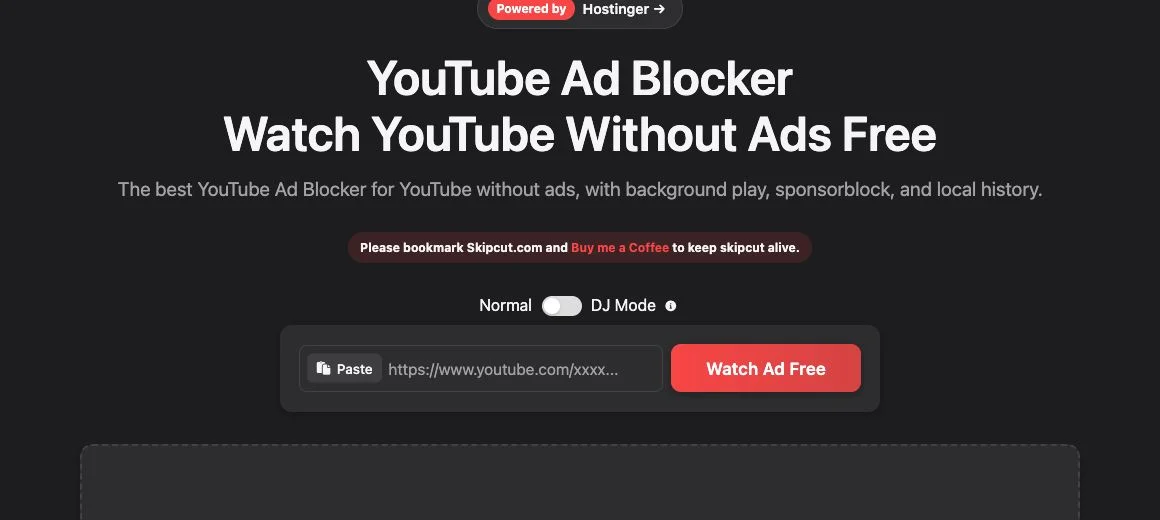
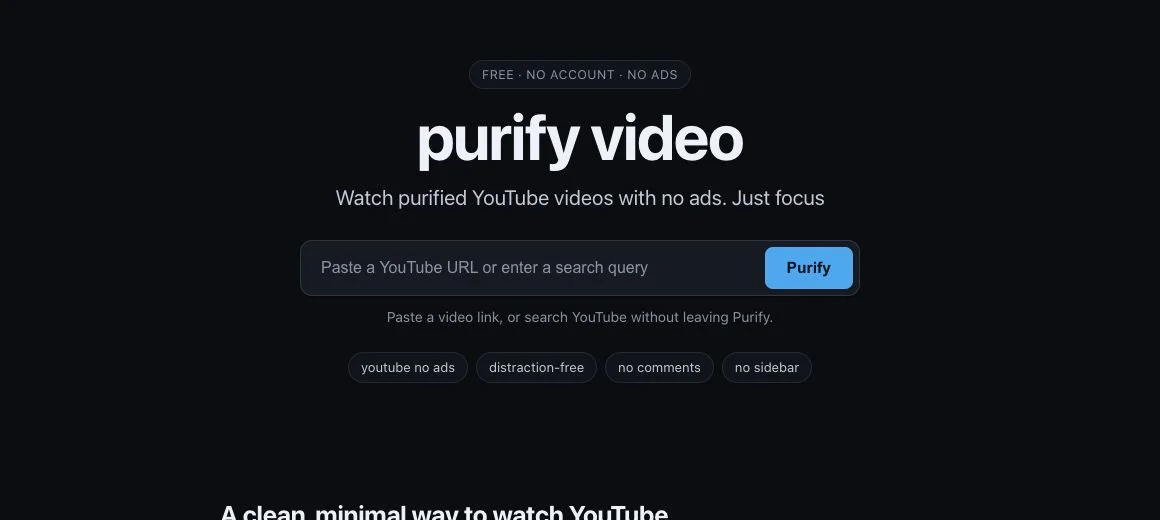
What do the two homepages look like?
These captures show the public starting pages, not a playback benchmark. A simple homepage and a feature-rich homepage serve different preferences; neither screenshot establishes speed or reliability.
Will background playback work on your phone?
Check your own browser before choosing either player for background audio. Mobile operating systems and browsers can pause embedded video when a tab loses focus or the screen locks. This comparison does not promise identical behavior on iPhone, Android and desktop.
- Open the same public YouTube video in each player and start it yourself.
- Switch to another app, then check whether the audio continues.
- Lock the screen and check the playback controls again.
- Repeat with the browser you normally use. A result in one browser is not evidence for another.
If background audio is your main need, see the iPhone background-play guide and background-play troubleshooting guide. For setup choices on Android, read the Android viewing guide.
Do you need to pay or create an account?
The basic public web player is advertised as free on both sites. You can compare those experiences without buying a subscription. Check each service for the current terms of any optional membership or extension.
Free access is useful for trying the workflow, but it does not establish a service-level guarantee. Test the videos and devices you actually use before depending on a player for a lesson, presentation or regular listening.
What does browser-local history mean?
Local history is a list saved in that browser, not an account library that follows you between devices. Clearing site storage can remove it. On a shared computer, another person using the same browser profile may be able to see that list.
Local history also does not make video playback anonymous: loading video and other website resources still involves network requests. Use a separate browser profile on shared devices and review each service’s current information before making a privacy decision.
What limitations should you know about?
- Some videos cannot play in embedded players. Owners can restrict embedding; age, location and other restrictions can also affect access. YouTube explains its embedding controls.
- SponsorBlock depends on submitted segments. It is a community database, so not every sponsorship has a matching entry. It is separate from YouTube’s own video ads. Read how SponsorBlock works.
- Interfaces and playback behavior change. Neither an attractive screenshot nor a feature claim is a cross-device reliability test.
- The viewing experience can still contain distractions. Removing comments from a watch page does not remove distracting content inside the video, and SkipCut’s discovery sections may not suit every focus session.
How do you try SkipCut as a Purify Video alternative?
You do not need to migrate an account. Copy the original YouTube video link, open SkipCut, paste it into the video field and select Watch Ad Free. Start with one familiar video so you can compare the controls and layout.
If you are choosing for someone else, send them the original link as well. That gives them a fallback if embedded playback is unavailable. Review the actual video before sharing it with children or a class; a cleaner player is not content moderation.
Try the player with your next video
Open SkipCut, paste a YouTube link and decide whether the workflow fits you.
Open SkipCut free →SkipCut vs Purify Video: common questions
Is SkipCut a Purify Video alternative?
Yes. SkipCut is a browser-based alternative for watching YouTube through a separate player. Choose it if you want a broader starting point with trending videos, live content and DJ Mode. Purify Video is a good fit for a minimal paste-and-watch workflow.
Are SkipCut and Purify Video free?
Both advertise free browser viewing without a required account for the basic player. This comparison covers the basic public players. Check each service for the current terms of any optional membership or extension.
Does Purify Video have SponsorBlock and playlists?
Yes. Purify Video documents both SponsorBlock and playlist support. They are shared features, not reasons by themselves to choose SkipCut.
Does either player guarantee background playback on my phone?
No guarantee is made here. Browser and operating-system restrictions can interrupt background playback. Try the same video on your own phone, then switch apps and lock the screen before relying on either player.
Is Purify Video the same service as SkipVids?
Purify Video says it is maintained by SkipVids. It presents Purify as its minimal player and directs people to SkipVids for a broader experience. SkipCut is a separate product.
Will either player play every YouTube video?
Do not assume so. Embedded playback can be limited by the video owner, age or location restrictions, or changes to YouTube and the browser. If a video fails, try the original YouTube link to distinguish a player issue from a content restriction.
Sources and how this comparison was made
This comparison is published by SkipCut, so it is not an independent review. Public feature descriptions and homepage interfaces were checked on October 19, 2026. The screenshots document those interfaces; no speed, uptime or cross-device playback benchmark is claimed.
- Purify Video official homepage and FAQ — feature descriptions, related SkipVids service and stated mobile limitations.
- SkipCut public homepage and FAQ — current interface and player features.
- SponsorBlock official site — community-submitted video segments.
- YouTube Help: Embed videos and playlists — embedding settings and restrictions.
The cover is an AI-generated illustration. The product screenshots are browser captures. Product names belong to their respective owners; no affiliation or endorsement is implied.